
TrueCap vs DealCheck: which rental analyzer fits you?
By TrueCap · built by a Philadelphia rental investor
DealCheck has served investors for years. TrueCap uses a different sequence: start with an address, inspect the assumptions, see a Buy Box fit, then connect the Offer Ceiling, downside, and presentation. Here is the comparison so you can pick the workflow that fits.
Free analyzer: no card or signup
TL;DR
Pick TrueCap if
- You want a fast address-to-underwrite sequence.
- You want labeled HUD rent and FRED rate benchmarks with a manual local property-tax input.
- You want core economics and Buy Box fit with the supporting math visible.
- You want Buy Box evaluation inside the analysis flow.
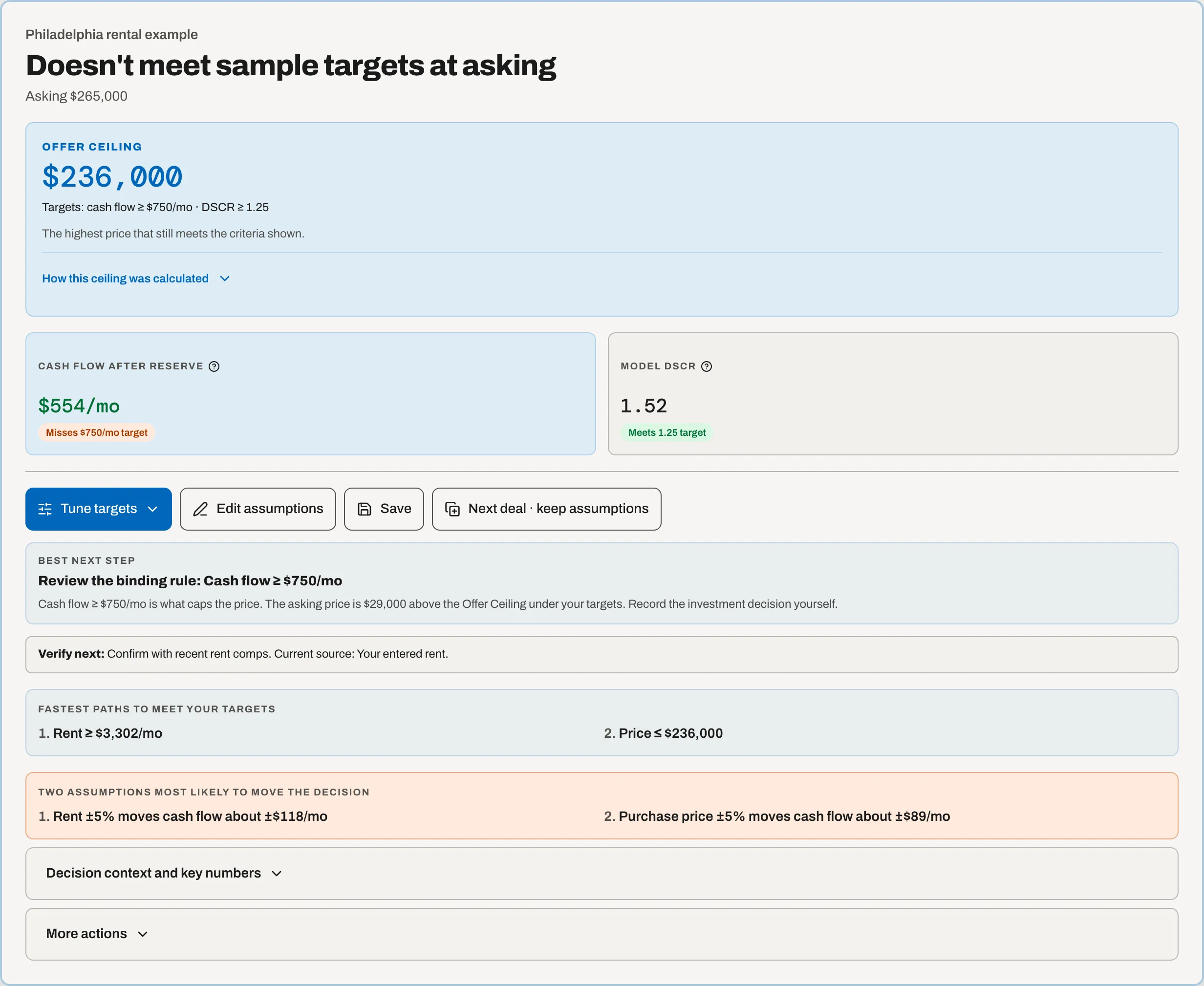
- You want an Offer Ceiling, downside, and decision packaging connected.
Pick DealCheck if
- You want native iOS + Android apps (TrueCap is PWA-only today).
- You're heavily invested in listing-import workflows.
- You already have a paid DealCheck plan and the muscle memory.
- You want a tool with a longer track record and BRRRR analysis.
Weighing more than these two? Full list: 7 best DealCheck alternatives
Workflow-by-workflow
Both products analyze rentals. The difference is how each gets you from inputs to action.
| Workflow | TrueCap | DealCheck |
|---|---|---|
| First screen | Address-first, no-signup screen with editable assumptions and core economics. | Account-based analysis with listing and property-data import workflows. |
| Starting assumptions | Labels editable HUD rent and FRED rate benchmarks, a manual tax input, fallbacks, and user edits. | Imports available property data and supports user-entered assumptions. |
| Purchase criteria | Buy Box checks the analysis inside the decision flow. | Custom purchase criteria screen properties against saved thresholds; the full set of criteria needs Plus or Pro. |
| Offer Ceiling | Offer Ceiling is connected to your Buy Box targets: the highest price that still meets them. | Its Offer Calculator calculates offers from configurable buying criteria on the Plus and Pro plans. |
| Downside | Sensitivity and downside scenarios sit directly after Buy Box fit and the Offer Ceiling. | Long-range analysis and editable assumptions support scenario evaluation. |
| Mobile | Responsive web app that can be installed as a PWA. | Native iOS and Android apps plus web access. |
| Investor clients (agents) | Agent Pro adds a client roster (up to 100 clients) and Buy Boxes you assign to clients (up to 12 per account), deal assignment, and client-report share links that open without an account; co-branded share pages and PDFs are in Pro and Agent Pro, with TrueCap's name kept. | Every DealCheck plan exports a PDF report; putting your own name and logo on it needs DealCheck Pro. Check its site for how client criteria and sharing work. |
| Best fit | Investors who want a guided address-to-underwrite sequence. | Investors who want a mature analysis ecosystem and native mobile workflow. |
Pricing, plan limits, and exact feature availability change. DealCheck details were reviewed against its official pricing, Offer Calculator, custom criteria, and report export documentation in October 2026. Features and prices can change.
Choose TrueCap when the decision sequence matters most
- Start with less setup. Enter an address, the asking price and a bedroom count for a first-pass screen, then refine the assumptions that matter.
- See where the inputs came from. TrueCap labels sourced starting points and keeps them editable.
- Move from result to review. Buy Box fit leads to the Offer Ceiling, downside, and verification tools instead of stopping at a metric summary.
- Reuse your own criteria. Buy Box targets stay connected to the verdict and offer calculation.
Prefer to get your head around a single metric first? Our walkthroughs on how to calculate cap rate, how to calculate DSCR, and the BRRRR workflow guide each walk the math end to end before you commit to a full underwrite. For the workflow itself, our guide on 60-second underwriting shows exactly how a TrueCap user moves from listing to a reviewed underwrite.
Common questions about TrueCap vs DealCheck
Quick answers to the questions investors comparison-shopping these tools actually ask.
Is TrueCap a free alternative to DealCheck?
TrueCap offers a no-signup first-pass screen with cap rate, cash-on-cash return, DSCR, monthly cash flow, and Buy Box fit. DealCheck also publishes a free plan; check its official pricing page for current limits. The better fit depends on whether you prefer TrueCap's address-to-underwrite sequence or DealCheck's established analysis and import workflow.
How much does TrueCap cost compared to DealCheck?
See TrueCap's live pricing page and DealCheck's official pricing page. Comparing the current pages is safer than relying on copied prices because either company can change plans.
Which tool is better for new investors?
TrueCap can fit a newer investor who values an address-first screen, labeled starting assumptions, and Buy Box fit. DealCheck can fit someone who wants its established property-import and native mobile workflow. Neither tool replaces verification or due diligence.
Does TrueCap have a mobile app like DealCheck?
TrueCap is a Progressive Web App (PWA) — you install it from the browser to your home screen. DealCheck has true native iOS and Android apps, which is the right call if you're heavy on mobile-first workflows like walking properties and analyzing on the spot. Both work on phones; the difference is delivery mechanism.
Can I import properties from Zillow or Redfin with TrueCap?
Partly. You can paste a Zillow, Redfin, Realtor.com, Homes.com or Trulia link and TrueCap pulls the address out of it, then can pre-fill an editable HUD rent benchmark and the FRED owner-occupied 30-year mortgage-rate benchmark. Property tax stays manual. What it does not do is scrape the listing page for price, taxes and photos — DealCheck's full property-detail import is deeper there. The trade-off is deliberate: TrueCap labels the source beside each starting value so you can review and replace it.
Which is better for an agent with investor clients?
It depends on the job. Every DealCheck plan exports a PDF report; putting your own name and logo on it needs DealCheck Pro. If all you need is a calculator PDF for a client, DealCheck covers that. TrueCap Agent Pro is for screening each listing against a specific client's Buy Box, showing that client's Offer Ceiling, and sending a co-branded decision memo the client can open without an account and rerun with their own assumptions. See TrueCap for agents for what the client receives.
When should I pick DealCheck over TrueCap?
Pick DealCheck if you're primarily mobile-first walking many properties a day, you want a native app, and listing-site property import is your top workflow. Pick TrueCap if you want an address-first screen connected to Buy Box fit, Offer Ceiling, downside analysis, and presentation tools.
On price, plainly
Tools in this space run from free to well above TrueCap — check DealCheck's live pricing for their current number. What TrueCap's price buys is the decision layer, not more calculation: an Offer Ceiling for your targets, Buy Box fit with reasons, the downside stress test, and assumptions that are source-labeled instead of silently defaulted. Whether that workflow justifies the price depends on your volume, verification process, and existing tools.
Screening listings for investor clients? TrueCap for agents keeps a client roster and screens each deal against the Buy Box of the client you assign it to.
Try TrueCap free — see if it fits your workflow.
Screen a property without a card, inspect the assumptions and core economics, then decide whether TrueCap's connected Buy Box, Offer Ceiling, downside, and reporting workflow fits how you acquire rentals.
About TrueCap
TrueCap is built by one person, a rental investor in Philadelphia. It started as the tool he wanted for his own underwriting — a way to get from an address to a source-labeled first-pass answer — and it's still how he runs the deals he considers.