
Send your investor clients deals that already pencil.
Paste the listing. See whether it clears your client's Buy Box, the highest price that still does (the Offer Ceiling), and what could break it. Send it co-branded with Pro or Agent Pro; your client can rerun it with their own numbers.
Cash flow · Cap rate · Cash-on-cash · DSCR · Buy Box fit · Offer Ceiling
A listing link fills in the address. You enter the asking price and bedrooms; a paid Pro or Agent Pro plan can fill them.
Screen deals free with no card. Agent Pro is a separate plan for client workflows; cancel anytime.
- Agent Pro
- $49.17/month billed annually
- Or month to month
- $59.99/month
- Roster
- Client roster included · up to 100 clients
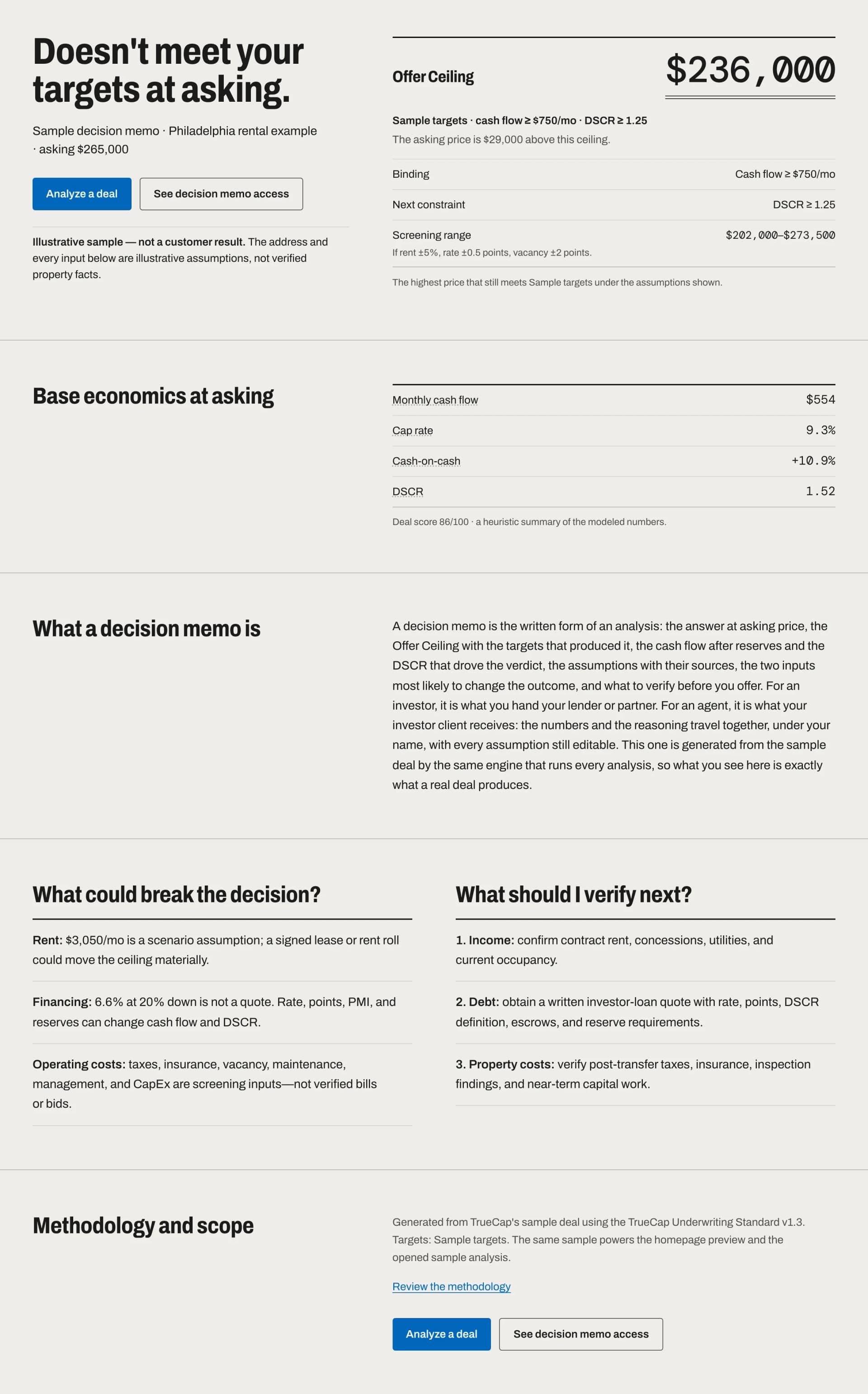
Investors answer the agent who already did the math.
- Save time
- First-pass numbers from the address, the asking price and a bedroom count, at the showing, on your phone. HUD rent and a FRED rate benchmark fill in as labeled starting values; you enter the property tax bill and the client's financing.
- Improve the client experience
- Send deals that already clear the client's Buy Box, with the math attached and your name on it, instead of a stack of listings. When one doesn't fit, say so with the specific criterion it missed.
- Get to the offer sooner
- A client who already knows the highest price that still meets their targets has one less reason to wait. The decision memo travels with the numbers and the reasoning together.
What your client receives
No account on their side, nothing hidden on yours. Branding is set up once in Settings and applies to every link and report.
- A share link that opens without an account
- Read-only and revocable from your dashboard; it expires after 180 days. The exact address stays hidden unless you choose to include it. Your client needs an account only to save a private copy.
- The decision memo, co-branded
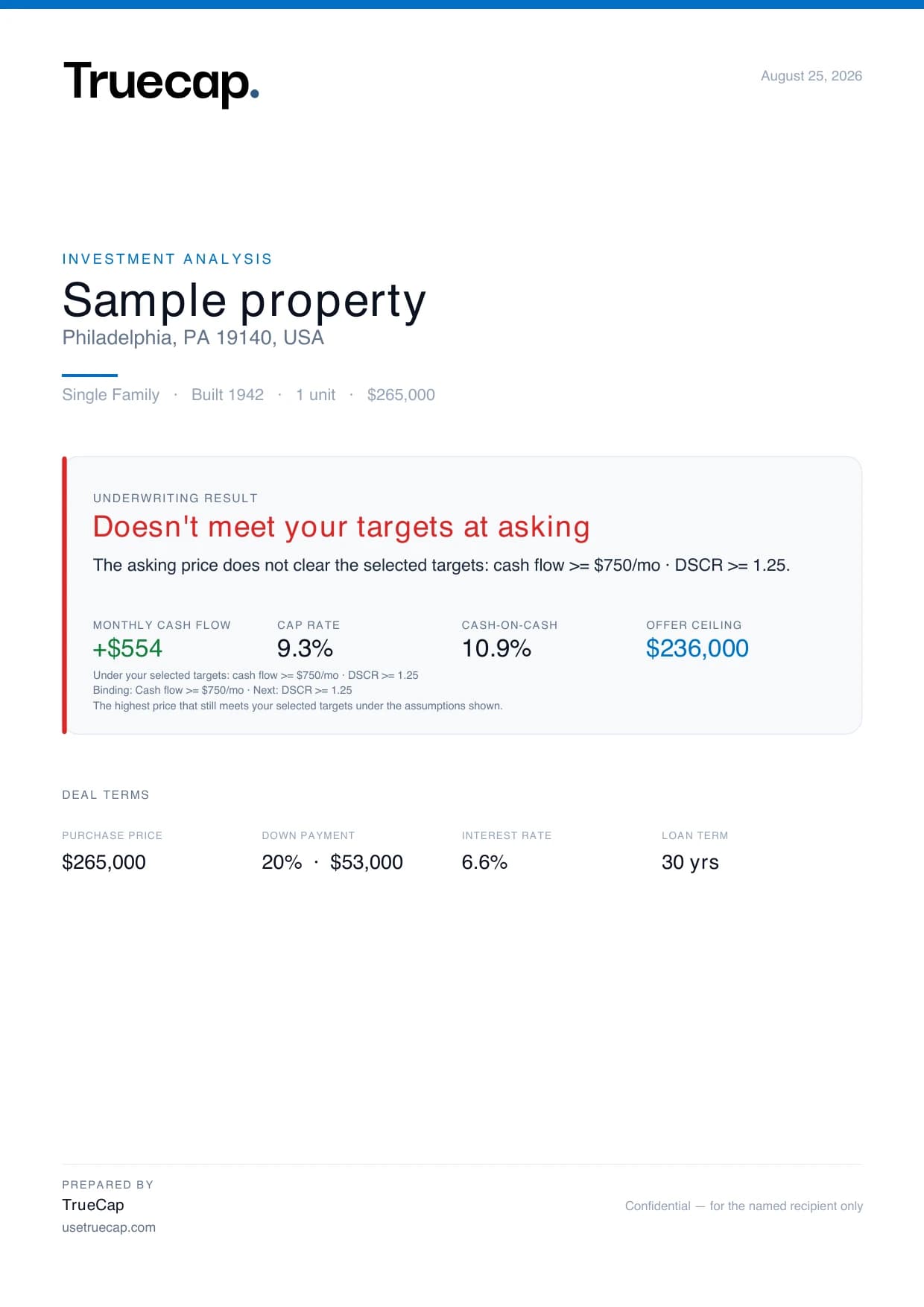
- With branding set up, the share page carries your logo, your brand color, and “Shared by” your name or company, with a form the client can use to message you and the phone, email and website you saved. The PDF adds your tagline and a “Prepared by” block with the same contact details. TrueCap's name stays on both as the methodology behind the numbers: co-branded, not white-label.
- The numbers behind the decision
- Shared from a Pro or Agent Pro account, the page shows cash flow, cash-on-cash, cap rate and DSCR, the three inputs that move cash flow most, and a sensitivity grid with the rent, vacancy and rate you used. When the deal was screened against a Buy Box or targets you chose, it also shows whether the deal meets the targets at asking and the Offer Ceiling with those targets. The PDF lists the inputs, including property tax, insurance and financing.
- The disclaimer, and their own rerun
- The share page states that it is a screening record, not a decision, and that every material assumption should be verified. One click copies the deal's numbers into the free analyzer, where your client can change any assumption and rerun it; when the address is hidden, they enter the property address themselves. The numbers arrive as entered values, without source labels.
How the client roster works
- A Buy Box per client
- Add a client to your roster (up to 100 clients) and assign a Buy Box to them: their cash-flow, cash-on-cash, DSCR, cap-rate, and price targets. An account keeps up to 12 Buy Boxes in total, yours and your clients' combined.
- Deal assignment
- Assign any saved deal to a client. From then on it is screened against that client's Buy Box, not yours. Share it as a client report: the link hides the address unless you include it.
- “Doesn't fit, and here's why”
- A miss names the criterion: “Biggest gap — Cap rate: 5.2% vs 6.5%.” A pass shows the tightest margin. The roster card shows how many of each client's assigned deals meet their criteria.
- One client per deal, today
- A deal is screened against one client's Buy Box at a time. To check the same listing for another client, reassign it or save it again. Screening one listing against the whole roster at once is not offered yet.
The agent workflow
- Open TrueCap on your phone or laptop at the showing.
- Paste the listing address. A HUD rent benchmark and the FRED 30-year benchmark fill in as editable starting values; enter the local property-tax bill or a reviewed rate yourself.
- Switch to the client's financing: their down payment, their lender's rate, a DSCR loan if that is what they use.
- Assign the deal to the client. It is screened against that client's Buy Box, and the Offer Ceiling shows the highest price that still meets their targets.
- Send the co-branded share link or PDF. If it misses, the memo names the criterion it missed and by how much.
The decision memo is to an investment purchase what a CMA is to a listing appointment: the document that shows the client what you did and why. It is a screening model, not an appraisal or an opinion of value.
Proof you can check
No customer counts, no brokerage logos, no quotes we cannot source. What you can verify before you pay:
- The sample decision memo
- Generated by the same engine, labeled as not a customer result.
- The published methodology
- The core formulas, shown. What you hand a client who asks how a number was calculated.
- Proof & methodology
- How quotes get published here: real account activity, consent, first name and market.
The objections, answered plainly.
Every answer below describes what TrueCap does today, not a roadmap. Where a limit exists, it is stated.
Still have a question? Email us.
My investor clients run their own numbers. Why would I need this?
They will, and they should. Agent Pro is for screening and presenting against their criteria, so what you send already fits. The client gets the decision, the Offer Ceiling and the numbers behind them, and can rerun the deal with their own numbers in the free analyzer.
Am I giving investment advice?
TrueCap does not give investment advice: it applies published formulas to labeled inputs. You supply the property facts; the client can rerun the deal in the free analyzer and change every assumption, and the decision is theirs. Every share page and report carries the not-investment-advice disclaimer. What you say to a client stays a matter for your license and your brokerage.
Do my clients need a TrueCap account to view what I send?
No. A share link opens without signing in. It is read-only, it expires after 180 days, you can revoke it, and it hides the exact address unless you choose to include it. When TrueCap updates its underwriting standard, earlier links stop opening: rerun the deal and share a new link. A client only needs an account to save a private copy.
What does the client see? Is it my branding or TrueCap's?
Co-branded, not white-label. With branding set up (included in Pro and Agent Pro), the share page carries your logo, your brand color, and “Shared by” your name or company, plus a form the client can use to message you and the phone, email and website you saved. The PDF adds your tagline and a “Prepared by” block with the same contact details. TrueCap's name stays on the page and in the report as the methodology behind the numbers.
Can I keep different criteria for different investor clients?
Yes. Your roster holds up to 100 clients, and a Buy Box can be assigned to one client so that client's deals are screened against their targets, not yours. An account keeps up to 12 Buy Boxes in total, your own and your clients' combined.
Can I run one listing against several clients at once?
Not yet. A saved deal is assigned to one client and screened against that client's Buy Box; to check the same listing for another client, reassign it or save it again. Each client's roster card shows how many of their assigned deals meet their criteria.
Where do the starting numbers come from?
Rent starts from a HUD benchmark (ZIP-level when available, otherwise the HUD Fair Market Rent area; when an address has no county match, a statewide HUD figure, labeled as such) and the rate from a FRED 30-year benchmark, both labeled. Property tax is your local input: until you enter the bill or a reviewed rate, the model labels its 1.1% assumption as a default to replace. Replace every starting value with the client's financing and property facts before you send.
I only get a few investor clients a year. Is it worth it?
Start free. The first decision needs no account, and a free account gets a 21-day trial with 3 Pro analyses and 1 comparison, no card. Subscribe to Agent Pro when a client is worth a roster entry, monthly or annually, and cancel from your profile when the season ends.
My brokerage already gives me tools.
TrueCap does not replace a CRM, transaction management, or e-signature. It screens a listing against a client's Buy Box and computes the client's Offer Ceiling, the highest price that still meets that client's targets. If your brokerage's tools already do that, you do not need TrueCap for it.
Will clients trust software numbers?
The output shows which criterion the decision hinges on (the biggest gap or the tightest margin against the client's targets) and what has to be true for the deal to work, so it starts the conversation rather than ending it. Every assumption is theirs to change: one click copies the deal's numbers into the free analyzer.
Does it work on my phone at a showing?
Yes. TrueCap is a responsive web app you can add to your phone's home screen; there is no native iOS or Android app. Share links and reports open on any phone.
What does the free trial include, and do I need a card?
Creating an account never asks for a card. The 21-day trial covers 3 Pro analyses and 1 comparison, enough to see the memo and the Offer Ceiling on your own listings; a rerun with changed inputs counts as a new analysis. Co-branding, client rosters and client Buy Boxes are part of the Agent Pro subscription, not the trial; checkout shows the exact charge before you confirm.
Can I cancel?
Yes. Cancel anytime from your profile. Agent Pro stays active until the end of the period you've paid for, then the account downgrades to Free. Your saved deals stay readable. Your client roster and Buy Boxes are kept but are not shown on Free, and they return when you resubscribe.
Share-ready resources for investor clients
When a client asks “is this a good deal?” the cleanest answer cites the math: send them the 60-second underwriting workflow, the explainer on what counts as a good cap rate in 2026, or the TrueCap analyzer for cap rate and DSCR from an address, the asking price and a bedroom count. They land on a single, well-cited page instead of a long email reply.
Put the calculators on your own website
9 of TrueCap's 10 free calculators can be embedded on your site with a copy-and-paste snippet that carries a “Powered by TrueCap” credit. A working calculator on your agent site is a credibility piece for investor visitors; it collects no leads and reports nothing back. Copy a snippet from the embed page.
Land the investor client: three scripts that work with an analysis attached
- 1 · Reactivate a cold investor lead.
- “Hi [name] — a [3-bed in Zip/area] listed this week and it screens better than most of what we looked at in [month]. I've attached my underwrite: rent benchmark, cash flow, and the highest price that still meets your targets. Worth 15 minutes this week?”
- 2 · Follow up after a showing, same day.
- “Before you get ten opinions from the internet: here's the analysis for [address]. You can rerun it with your own numbers and change any assumption. At asking it [meets / misses] your targets; the Offer Ceiling shows the highest price that still does. Tell me which assumption you'd challenge.”
- 3 · Introduce yourself to an investor you want.
- “I work with rental investors in [market] and I run the numbers on every property before I send it — attached is a sample analysis so you can see exactly how I evaluate deals. If you tell me your buy criteria, everything I send you will already be screened against them.”
All three work because the attachment does the arguing. The analysis is the asset; the message is just the handshake.
If you are comparing this with DealCheck
Every DealCheck plan exports a PDF report; putting your own name and logo on it needs DealCheck Pro. If a branded calculator PDF is all you need, DealCheck Pro covers that. Agent Pro is for screening each listing against a specific client's Buy Box, showing that client's Offer Ceiling, and sending a co-branded decision memo that carries the numbers and what could break the deal. Check DealCheck's current pricing on its own site; the full comparison is kept deliberately fair.
Agent Pro
Everything in Pro (Offer Ceiling, downside stress test, comparisons, 10-year projection, co-branded share pages and PDFs) plus the client roster: per-client Buy Boxes, deal assignment, and client-report share links.A new account gets a 21-day free trial with 3 Pro analyses and 1 comparison, no card. A rerun with changed inputs counts as a new analysis. Co-branding, the client roster and client Buy Boxes are part of the Agent Pro subscription, not the trial.
- Billed annually
- $49.17/month
- $590 charged once a year
- Month to month
- $59.99/month
- Cancel from your profile anytime
- Free trial
- $0
- 21 days, 3 Pro analyses, no card. A rerun with changed inputs counts as a new one. The roster starts with Agent Pro.
Investing yourself as well? See TrueCap for buy-and-hold and house hackers, or read the BRRRR guide and the 70% rule guide.